Selling without an EBM receipt can cost you a fine. Issue yours from your phone.
RRA lists a 200,000 RWF fine for a non-VAT-registered seller who sells without an EBM receipt, and 10 times the evaded VAT for a VAT-registered seller. 5,000 RWF a month. Free for 14 days.
Free for 14 days, up to 10 documents. No card.
Built to RRA's CIS for VSDC specification. RRA approval is pending.
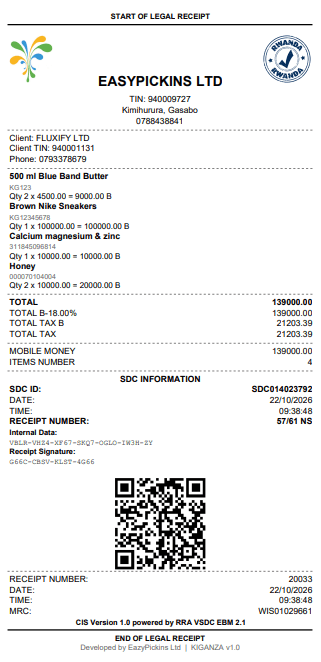
From 5,000 RWF a month
Free for 14 days, up to 10 documents
Works on phone, tablet and laptop
Every receipt signed through RRA's system
The problem
Sound familiar?
Your EBM device stops. Customers wait.
You wait for a technician while the queue builds.
Issue receipts from any phone or laptop on your account.
You worry about a fine.
RRA lists a 200,000 RWF fine for a non-VAT-registered seller who sells without an EBM receipt. A VAT-registered seller pays 10 times the evaded VAT.
Every sale gets a receipt signed through RRA's system.
Clients pay late and you chase them by phone.
You send an invoice, then call for two weeks.
Put a payment link on the invoice and let the client pay by MoMo or card.
At month end you add up receipts by hand.
You count paper to file VAT.
End-of-day and VAT reports are ready to download.
You switch between clients' TINs all day.
Each client sits in a separate system.
Switch client TINs on one login.
Launch offer
10% off Starter and Business for 12 months
Use code LAUNCH2026 at checkout. New customers only. First 50 businesses, monthly plans.
Monthly Starter and Business only. Cannot be combined with the 20% annual saving.
Two ways to work
One account. Two ways to work.
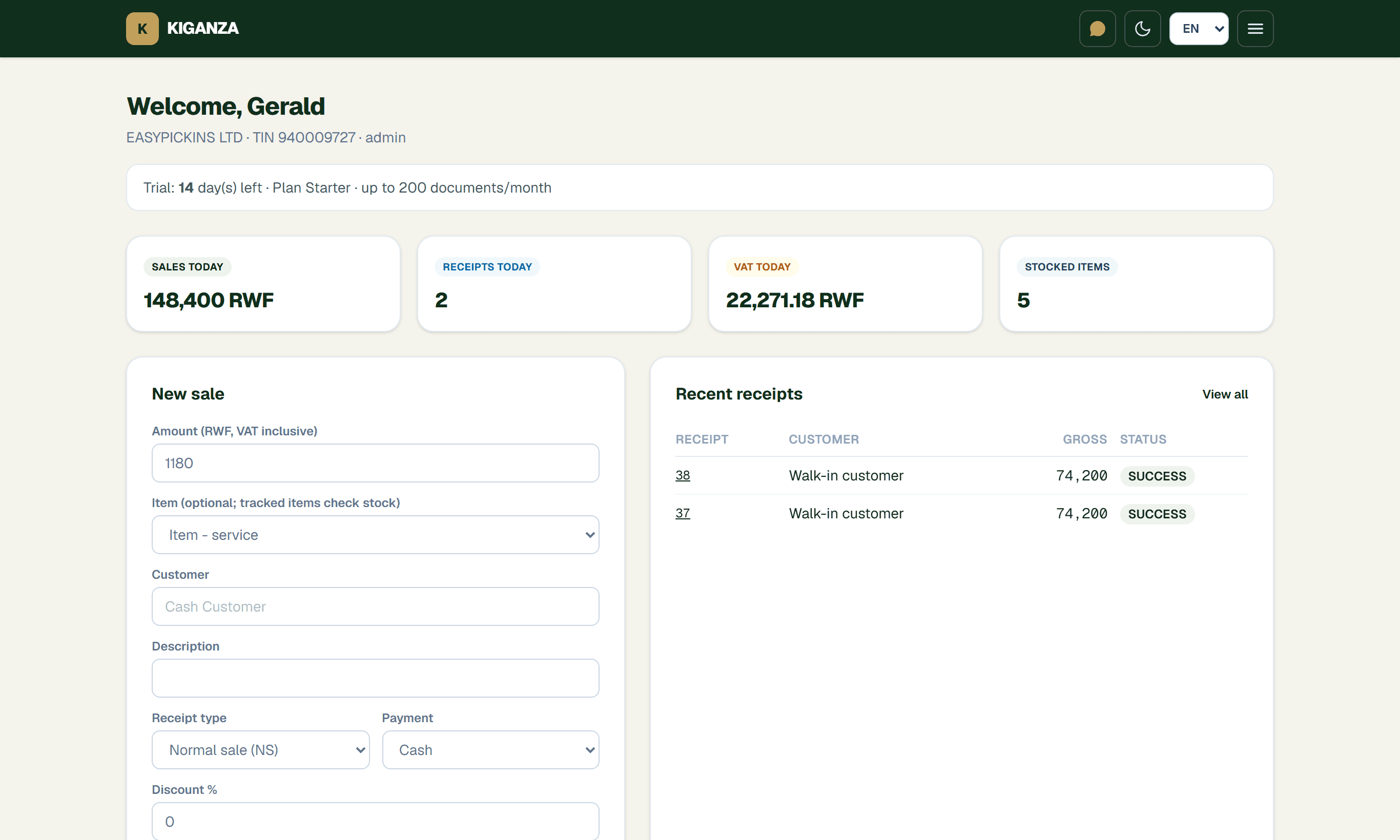
Dashboard
For consultants, lawyers, wholesalers and creators. Issue invoices and receipts, track clients, see reports, run inventory and manage staff.
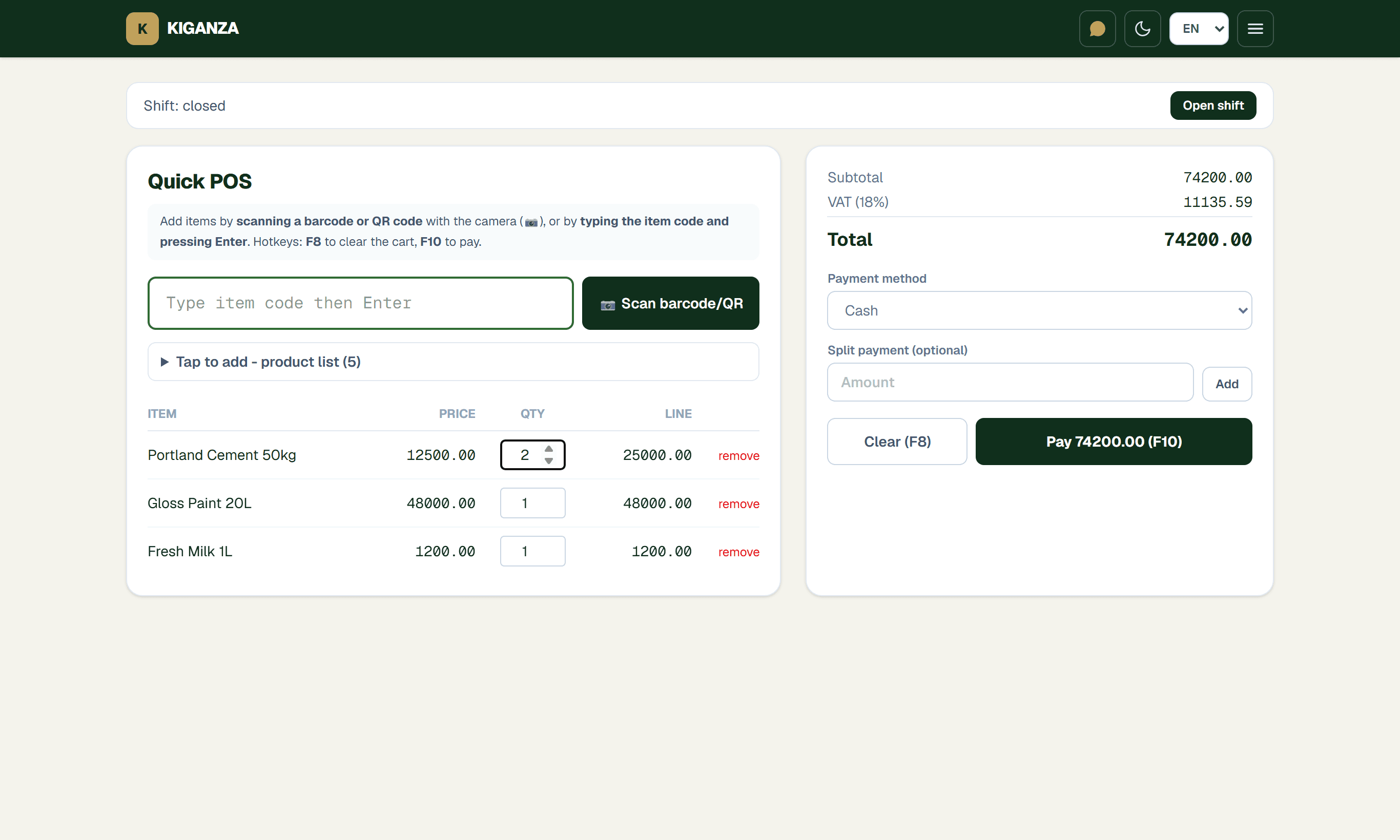
Quick-POS
For shops, supermarkets, cafes and restaurants. A fast cashier screen with barcode and QR scanning, keyboard shortcuts, split payments and thermal printing.
See it in action
From sale to signed receipt in seconds
Watch a receipt go from the till to your customer's phone, submitted to RRA's VSDC.
Issuing a receipt on a phone
Features
What you get on day one
From the first sale of the day to the VAT report at month end, KIGANZA handles EBM compliance end to end.
RRA-signed receipts and invoices
Every document carries RRA's signature details and a QR code.
Share by WhatsApp, email or link
Each document has its own link and PDF.
Automatic VAT
The tax type of each item (A to D) is calculated, including for non-VAT sellers.
Reports and VAT report
End-of-day sales report (Z-report), a sales report any time (X-report), and the VAT you owe this month.
Pay from the invoice
Your client pays by MTN MoMo, Airtel Money, card or bank. Funds settle to your own account.
More tools
Inventory and barcode labels
Scan or type items, sell loose goods by weight, get low-stock alerts and print barcode labels.
Staff logins
Roles for owner, manager, cashier and accountant. Shifts open and close with a report.
Scan receipts into expenses
Photograph a supplier receipt and KIGANZA reads the vendor, amount, VAT and date into your expense book. Photos are never stored.
Sales forecast and targets
See projected sales and VAT for the coming month, and set monthly targets.
Late-payer scoring
See which customers may pay late and what is at risk, with statements and reminders.
Customer groups
See your best customers, new customers and customers who stopped buying.
Customer TIN check
Check a customer's TIN with RRA and save the business name for next time.
Use it like a phone app
Add KIGANZA to your home screen and it opens full-screen. No app store, no download.
Compliance and stock checks
A daily checklist flags failed receipts, missing buyer TINs and stock that has not moved in months.
Get paid faster
Send the invoice. Your client pays from the same link.
- 1You issue an RRA-format invoice and send it.
- 2Your client opens the link and sees the invoice and QR code.
- 3They pay by MTN MoMo, Airtel Money, card or bank.
- 4You get a WhatsApp or email message the moment payment is confirmed.
How it works
Four steps from sale to signed receipt
- 1
Sign up
Use your email. Add your TIN now or later.
- 2
Add your details
Add your business details, items and customers.
- 3
Create an invoice or receipt
Pick the customer, items, tax type and payment method.
- 4
KIGANZA signs and sends it
RRA signs the document. Your customer gets it by WhatsApp, email or link.
Who it's for
Built for how Rwandan businesses actually sell
Shops, supermarkets, cafes and restaurants
Issue receipts from a laptop or phone today. Quick-POS with barcode scanning is built in.
Freelancers, consultants and creators
Send a signed invoice the same day you finish the work, with a payment link on it.
Accounting firms and bureaus
Manage every client's TIN from one login, and switch between them in a tap.
Small sellers who are not VAT registered
You can issue EBM receipts without charging VAT. KIGANZA supports tax type D.
Not VAT registered? The rule depends on your tax return. Ministerial Order 006/26/10/TC requires taxpayers who file an annual income tax return to use electronic invoicing on every sale. Taxpayers who do not file an annual return are exempt from issuing on every sale, but must approve invoices their buyers initiate. Using EBM does not mean you pay VAT.
Why KIGANZA
KIGANZA, RRA's own EBM options and a bought device
RRA offers free EBM software, a mobile app and Online EBM. A bought device is another route. Here is what each one gives you.
| What you get | RRA's own options | A bought EBM device | KIGANZA |
|---|---|---|---|
| What you need | A compatible phone, tablet or computer. Online EBM needs only a browser. | An approved EBM device | A phone, tablet or laptop you already own |
| Best for | Basic invoicing. Online EBM is for services with 10 invoices a month or fewer. | One till at one location | Shops, freelancers and accountants |
| Monthly documents | Online EBM: 10 invoices a month or fewer | Set by the device supplier | 300 or 10,000 a month |
| Sharing documents | WhatsApp, email or link | ||
| Pay from the document | No payment link | No payment link | MoMo, card or bank link |
| Staff logins | One user | One till | 1 to 5 users, depending on plan |
| Reports | End-of-day report | End-of-day report | End-of-day, any time, VAT and item reports |
| Several TINs | One TIN per installation | One TIN per device | Switch client TINs on one login |
| Internet | Needed | Prints receipts. RRA rules apply. | Needed for each RRA signature |
| Cost to start | Apply to RRA. You supply the device. | Buy the device | 14-day free trial |
Pricing
Simple pricing in RWF
Prices are in RWF, VAT included. Every plan starts with a 14-day free trial, up to 10 documents, no card. Pay monthly by MTN MoMo or Airtel Money, or pay 12 months at once and save 20%.
Starter
For freelancers, consultants and small shops.
5,000 RWF
48,000 RWF a year
- Users1
- Documents300 a month
- Invoices and receiptsYes
- End-of-day and any-time reportsYes
- VAT reportYes
- Payment linksYes
Business
For shops, wholesalers and growing teams.
24,900 RWF
239,000 RWF a year
- Users5
- Documents10,000 a month
- Invoices and receiptsYes
- End-of-day and any-time reportsYes
- VAT reportYes
- Expense log and profit summaryYes
- Inventory and barcode labelsYes
- Payment linksYes
Accountants
For firms managing several clients.
6,000 RWF
Per client TIN a month
- Per client TIN6,000 RWF a month
- From 10 clients5,500 RWF per client TIN
- Minimum5 clients
- Invoices and receiptsYes
- End-of-day and any-time reportsYes
- VAT reportYes
- Multi-client TIN switchingYes
A document is one receipt or one invoice. The 20% annual saving and LAUNCH2026 cannot be combined. Payment links carry a provider fee, shown before the client pays.
Proof
We use it ourselves
EazyPickins Ltd issues its own receipts and invoices on KIGANZA.
“We built KIGANZA because we needed it. A receipt now takes our team seconds, and at month end we send the VAT report to our accountant without touching a spreadsheet.”
For accountants
Manage every client's EBM from one login
Pay 6,000 RWF per client TIN a month, minimum 5 clients. From 10 clients the rate is 5,500 RWF, so 12 clients cost 66,000 RWF a month.
Try it with one client first. We set up the client TIN and show you the switcher before you commit to five.
Book a 15-minute demo on WhatsApp- Download each client's VAT report.
- Issue invoices and receipts for each client TIN.
- Switch between client TINs in a tap.
FAQ
Questions, answered
Is KIGANZA approved by RRA?+
Not yet. KIGANZA is built to the RRA CIS for VSDC specification and runs on the RRA sandbox. We will publish the approval wording and reference here when RRA issues it.
What happens after 10 trial documents?+
Issuing stops until you choose a plan. Your data stays, and you can upgrade in the app or on WhatsApp.
Do I need EBM if I'm not VAT registered?+
It depends on your tax return. Ministerial Order 006/26/10/TC requires taxpayers who file an annual income tax return to use the electronic invoicing system on every sale. Taxpayers who do not file an annual return are exempt from issuing on every sale, but must approve invoices their buyers initiate. Using EBM does not mean you pay VAT.
What if my internet drops?+
KIGANZA needs internet to get RRA's signature on each receipt. Switch to mobile data. Offline selling is not available yet.
Which plan do I need?+
Starter: 1 user, 300 documents a month. Business: 5 users, 10,000 documents a month, inventory and expense log. Accountants: 6,000 RWF per client TIN a month, minimum 5 clients.
How much does it cost?+
From 5,000 RWF a month. See the plans above. Pay for 12 months and get 20% off.
Do you have a launch discount?+
Yes. New customers can use LAUNCH2026 for 10% off Starter or Business monthly plans for 12 months. It applies at checkout while the first 50 places last. Annual plans and the Accountants plan are excluded.
How does the free trial work?+
14 days, no card, up to 10 documents. One document means one receipt or one invoice. Your trial starts when you sign up with your TIN; without a TIN, it starts after we verify your business details.
Can my client pay from the invoice?+
Yes. Your client opens the link and pays by MTN MoMo, Airtel Money, card or bank where online collection is enabled. Once the provider confirms the payment, the invoice is marked paid.
Can I print on a thermal printer?+
Yes. You can print from your browser. One-click printing is built into Quick-POS.
Do I have to give up my current EBM?+
No. You can keep it while you trial KIGANZA.
Is my data safe?+
Your sales data is stored in a managed cloud database. Only your logins can see your sales.
Who helps me if I get stuck?+
WhatsApp, phone call or email. WhatsApp is the fastest, or call 0793 378 679 during business hours. You can also email [email protected].
How do I cancel?+
Send us a WhatsApp message. No contract.
Do I need to download an app?+
No. Use it in your browser, or add it to your home screen so it opens like an app.
How do I install it on my phone?+
On Android, open the browser menu and choose 'Add to Home screen'. On iPhone, open the site in Safari, tap Share, then 'Add to Home Screen'.
What if RRA's system is down?+
Every receipt must be signed by RRA's VSDC. If RRA's system is temporarily unavailable, KIGANZA shows an error and does not issue a receipt. Try again shortly. Nothing is lost, and offline selling is not available.
Does KIGANZA help me understand my numbers?+
Yes. The Insights page forecasts your sales and VAT, groups customers, flags who may pay late and highlights compliance issues. There is also Ask Your Data: type a question and get an answer.
Can I record expenses from a photo of a receipt?+
Yes. On the Expenses panel, choose Scan receipt and photograph the receipt. KIGANZA reads the vendor, amount, VAT and date into the form. The photo is not stored.
Can I send statements and payment reminders?+
Yes. Send a customer statement by email from the Statements page, and a reminder from the Payments page, where overdue invoices are shown in colour.
Contact
Talk to us your way
Pick whichever is easiest. We reply during business hours.
Try KIGANZA free for 14 days
Tell us your business name, email and phone. Add your TIN now or later. Your 14-day trial starts when you sign up with your TIN; without one, it starts after we verify your business details.